
In today’s fast-paced digital landscape, businesses rely on WhatsApp Business to engage with their customers efficiently. To make this integration seamless, Chatify Bot now supports WhatsApp Embedded Signup, allowing businesses to connect their existing WhatsApp Business App accounts to Chatify Bot effortlessly. Additionally, Chatify Bot enables businesses to leverage WhatsApp Cloud API to manage marketing tasks effectively— all while continuing to use WhatsApp on their mobile device .
QR Scan for WhatsApp Connect
Many users refer to the connection process as QR Scan for WhatsApp Connect , as it allows quick authentication and linking of your WhatsApp Business App with Chatify Bot. While traditional methods involve number verification, scanning a QR code is an intuitive and faster way to sync your account. With Chatify Bot, whether you’re connecting a new number or an existing WhatsApp Business App, you can easily integrate via Meta’s Embedded Signup and Cloud API .
Previously, businesses could only use the WhatsApp Business Platform with a new phone number , which meant the number couldn’t be linked to an existing WhatsApp App. However, Meta now allows businesses to connect their existing WhatsApp Business App numbers to the WhatsApp Business Platform via Cloud API , meaning you can continue using your WhatsApp mobile app while managing automation through Chatify Bot .
In this guide, we’ll walk you through both methods so you can choose the right approach for your business.
Understanding WhatsApp Business App vs. WhatsApp Business Platform
What is WhatsApp Business App?
WhatsApp Business App is a mobile-based solution designed for small businesses to communicate with customers. It can be installed on smartphones and used to handle business inquiries, send messages, and provide customer support.
What is WhatsApp Business Platform?
WhatsApp Business Platform (previously only available for API-based integrations) is a more advanced solution for businesses requiring automation, scalability, and API-based integrations . Before, businesses had to register a new phone number to use this platform—meaning it couldn’t be linked to an existing WhatsApp Business App.
But now, Meta has introduced a game-changing update! Businesses can now connect their existing WhatsApp Business App numbers to the WhatsApp Business Platform via Cloud API . This means businesses can use:
- A new phone number for the WhatsApp Business Platform (API-only use).
- An existing WhatsApp Business App number on the Business Platform .
- The same WhatsApp Business App number on both a mobile device and Chatify Bot for seamless management.
What Is WhatsApp Embedded Signup?
WhatsApp Embedded Signup is a streamlined onboarding process provided by Meta that allows businesses to connect their existing WhatsApp Business App directly to WhatsApp Business API without requiring third-party approvals or extensive manual configurations.
With Chatify Bot’s integration , you can:
- Connect your existing WhatsApp Business App without creating a new number.
- Manage customer chats, send automated messages, and track analytics from Chatify Bot.
- Continue using your WhatsApp Business App on your mobile phone while leveraging the powerful marketing tools of Chatify Bot’s Cloud API .
Prerequisites
Before you begin, ensure that:
- You have an existing WhatsApp Business App (not a personal WhatsApp number) OR a new number ready for Business Platform.
- You have admin access to the WhatsApp Business Account.
- You have a phone number that is eligible for onboarding (not already linked to another WhatsApp API account, unless migrating from Business App).
Step-by-Step Guide to Connecting WhatsApp Business App to Chatify Bot
Step 1: Navigate to WhatsApp Integration in Chatify Bot
- Log in to your Chatify Bot dashboard.
- Go to WhatsApp > Connect Account .
- Click on “Connect WhatsApp” .
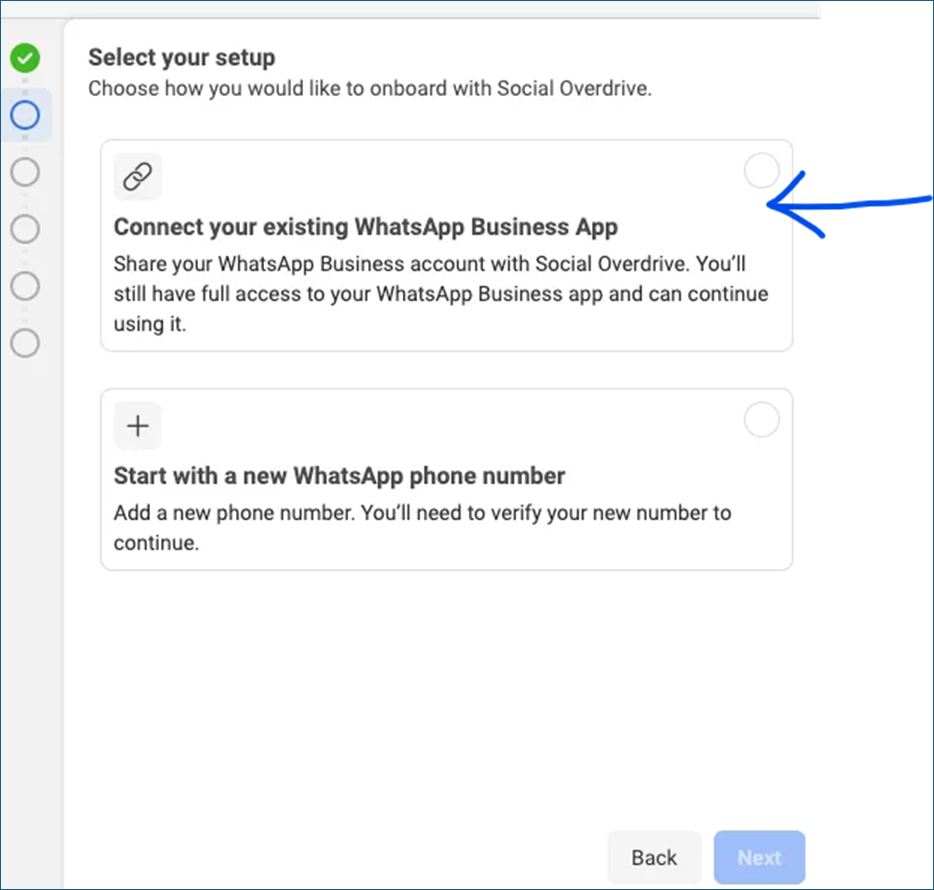
Step 2: Launch the WhatsApp Embedded Signup Flow
- Click on the “Continue with Facebook” button.
- Log in to your Facebook Business Manager account.
- Select the existing WhatsApp Business Account you want to connect.
- Choose the phone number associated with your business.
- Accept the necessary permissions and terms of service .
Step 3: Enable WhatsApp Cloud API for Marketing
- Once connected, Chatify Bot will integrate with the WhatsApp Cloud API .
- You can now:
- Automate customer responses.
- Create marketing campaigns with WhatsApp bulk messaging.
- Set up promotional notifications and abandoned cart reminders.
- Continue using WhatsApp Business App on your mobile device while managing advanced marketing tasks in Chatify Bot.
Syncing Your Old Contacts and Chat History with Chatify Bot
Once you’ve connected your WhatsApp Business number, you have the option to sync your past contacts and conversation history. This ensures that existing customer interactions are accessible within Chatify Bot.
To do this, click the “Fetch Contacts and History” button. Note: This sync option is only available within the first 24 hours after connecting your number. After that, syncing cannot be enabled.
Common Issues & Troubleshooting
1. Phone Number Not Eligible for Onboarding
Reason: The number is already in use with another WhatsApp API or personal WhatsApp account. Solution: Remove the number from the previous account and wait at least 10 minutes before retrying.
Why Choose Chatify Bot for WhatsApp Business Marketing?
- Seamless Integration – No coding required, direct signup with your existing WhatsApp Business App.
- WhatsApp Cloud API Support – Access advanced messaging and automation features.
- Marketing Automation & Chatbots – Set up AI-driven interactions with your customers.
- Campaign & Notification Features – Engage customers with WhatsApp marketing campaigns.
- Use WhatsApp on Your Mobile – Continue using WhatsApp Business App on your phone while leveraging Chatify Bot’s advanced API features.
- User-Friendly Dashboard – Manage conversations, analytics, and automation from one place.
By leveraging WhatsApp Embedded Signup and Cloud API , you can quickly integrate your WhatsApp Business App with Chatify Bot and unlock powerful customer engagement tools.
=======
Frequently Asked Questions (FAQs)
1. If I send a message from the WhatsApp Business mobile app, will it be available in the Chatify Bot inbox?
Yes, any message sent from the WhatsApp Business mobile app will also be available in Chatify Bot’s inbox. The chat remains synchronized.
2. When I connect my WhatsApp Business number to Chatify Bot, will my old contacts and chat history be synced?
Yes, you have the option to sync your existing contacts and conversation history when connecting your WhatsApp Business number to Chatify Bot. However, this option is only available within the first 24 hours after connection. After that, syncing will no longer be possible.
3. Can I reply to messages from both the Chatify Bot inbox and the WhatsApp Business mobile app?
Yes, you can reply to messages from both platforms. However, for chatbot automation and campaign messages, it is recommended to manage responses through Chatify Bot.
4. If I uninstall the WhatsApp Business app from my phone, will Chatify Bot still work?
Yes, Chatify Bot will continue to work independently as it operates through the WhatsApp Cloud API. However, if you reinstall the app and use it alongside Chatify Bot, messages will still sync between both platforms.
5. Will my chatbot handle all messages automatically?
Yes, the chatbot will handle messages based on your predefined flows. However, you can always take over a conversation manually from the Chatify Bot inbox if needed.
6. Can I schedule messages or bulk send campaigns with Chatify Bot?
Yes, Chatify Bot allows you to schedule messages and send bulk campaigns to your subscribers as per WhatsApp’s messaging rules and your plan’s limits.
7. Will I get notifications for new messages in Chatify Bot?
Yes, Chatify Bot provides real-time notifications for new messages, ensuring that you don’t miss any customer inquiries.