
- Introduction
With WhatsApp becoming a significant tool for business communication, incorporating your catalog into this popular messaging app can help you increase sales and reach a larger audience.
The WhatsApp Catalog API is a core component of the WhatsApp Business API, allowing businesses to easily develop and manage product catalogs from within WhatsApp. Businesses can use this functionality to successfully showcase their goods to customers, giving them with detailed product information all within the ease of their preferred messaging app. This streamlined experience has the potential to significantly increase consumer engagement and sales.
Initially, you must construct an ecommerce catalog and then connect it to the WhatsApp Cloud API.
- Procedure
Part 1:
To accomplish this, please follow the steps provided below: –
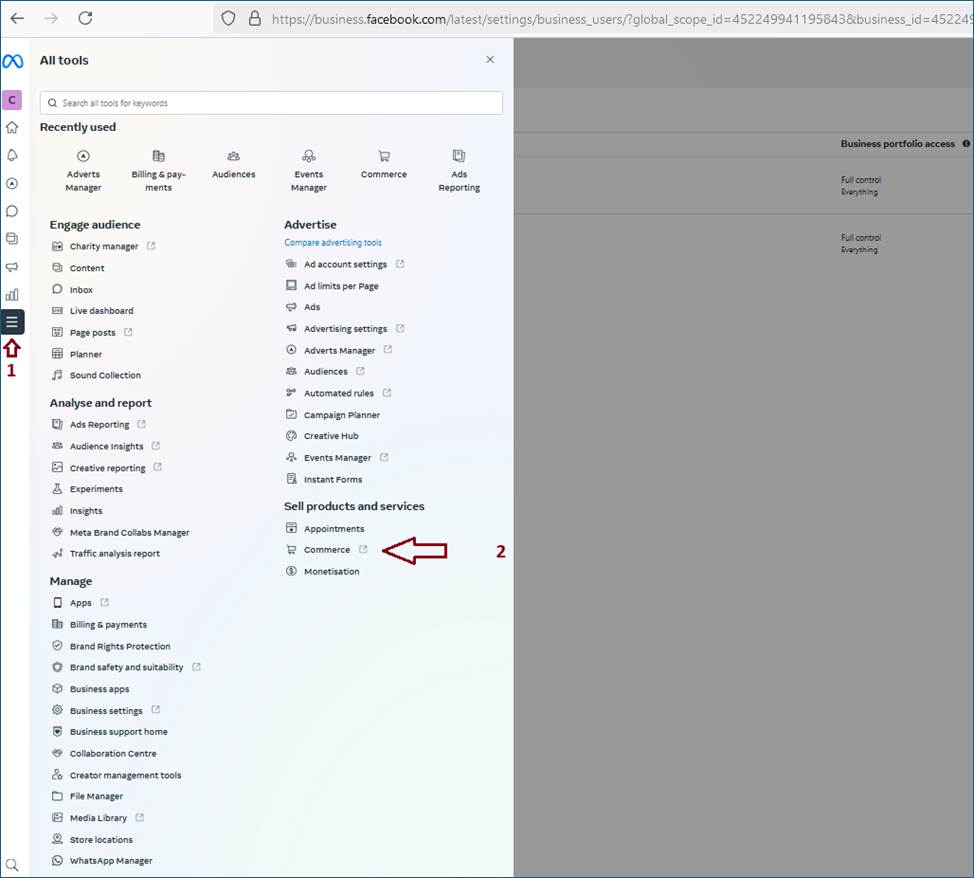
- At first, go to the business.facebook.com, then from all tool’s menus go to commerce.
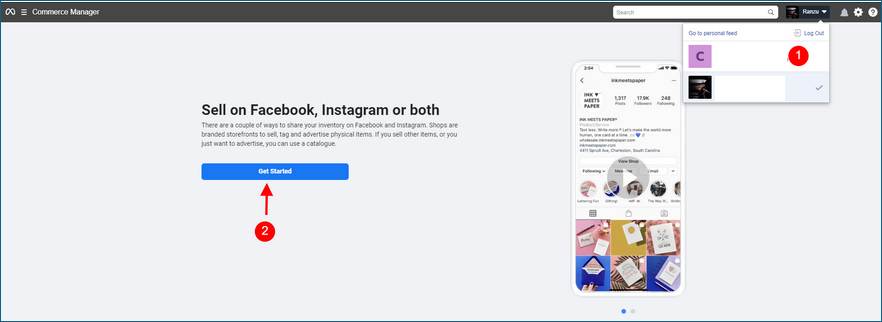
- From the top right corner click on the profile and select your business account. Then click on the Get Started button.
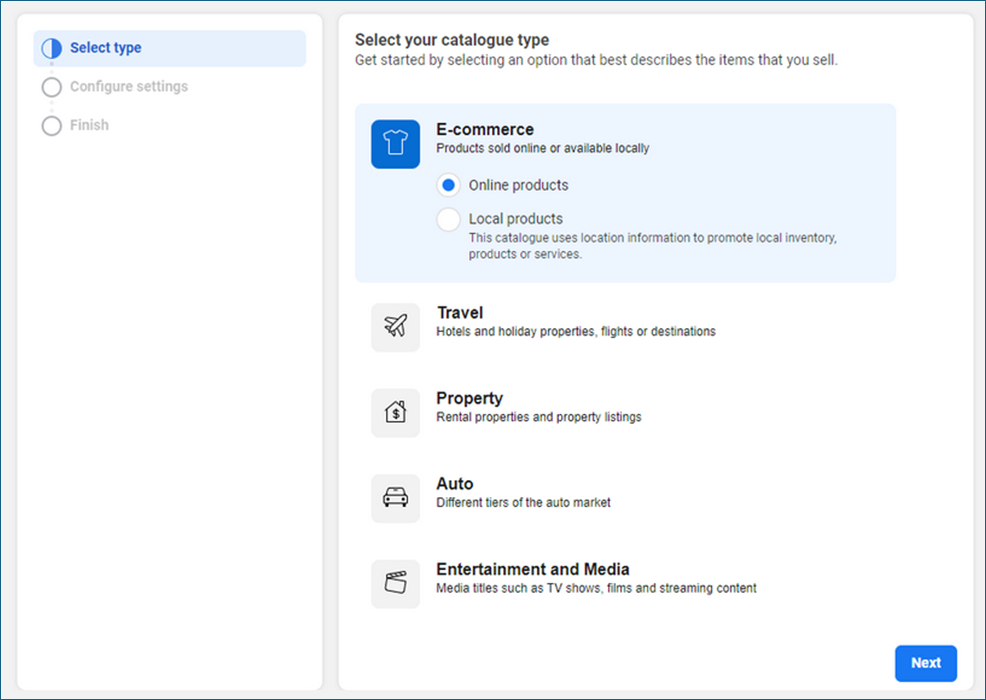
- On the next page just select the option to create a catalog and then click on the get started button again. Then select ecommerce and select the product types whether they are online products or local products. Then click on the next button.
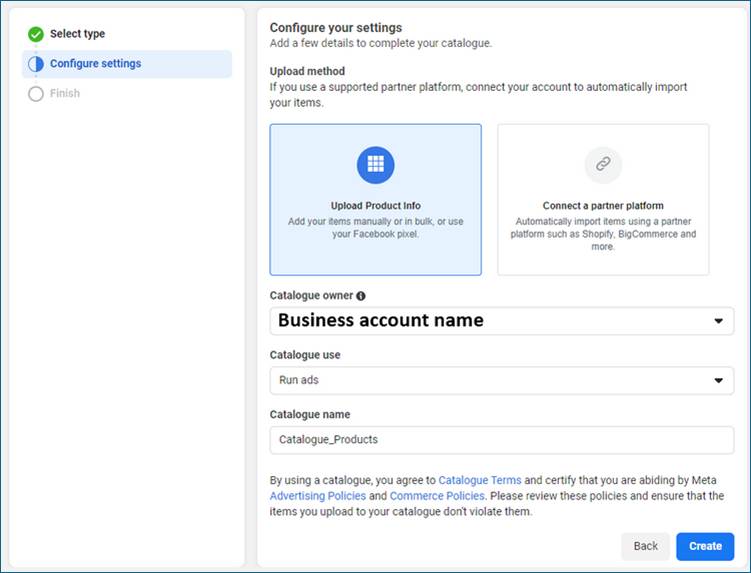
- You have to select an upload method. There are two types of upload methods. One is to upload manually, and the other one is by connecting partner platforms like Shopify and BigCommerce. Then select the catalog owner, it’s actually the business that you have with Facebook. Then there is catalog use and catalog name. You need to provide a catalog name here.
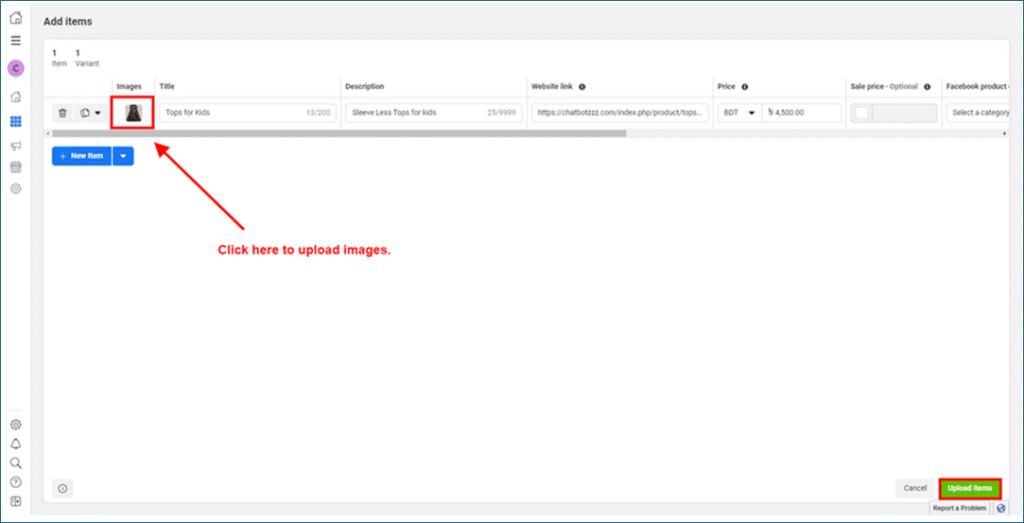
- After creating the catalog click on the view catalogue. Then click on the add items button to add products. Then select Manual to upload the product manually. We need to upload images, titles, and descriptions of the product. Finally, click on the upload items button. You can add as many products as you want.
Part 2:
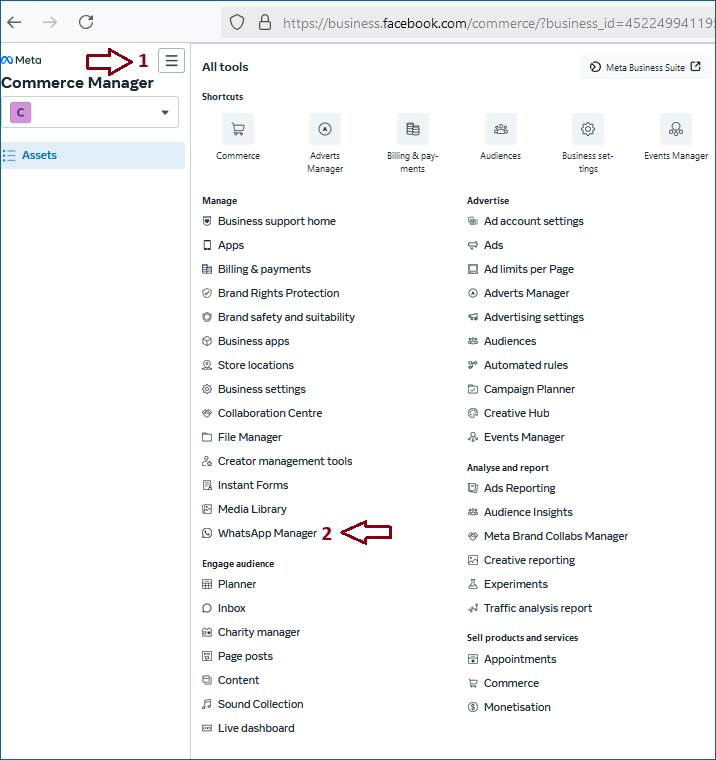
- After creating the catalog in the commerce manager, you must add the catalog to the WhatsApp cloud API. To do that, first click on the All-Tools menu and select WhatsApp Manager.
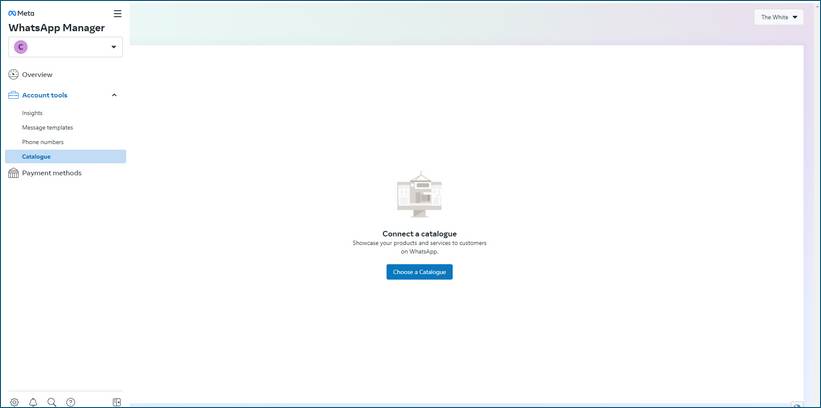
- From the account tools, select Catalog. Then click on the Choose Catalog button. From the account tools, select Catalog. Then click on the Choose Catalog button.
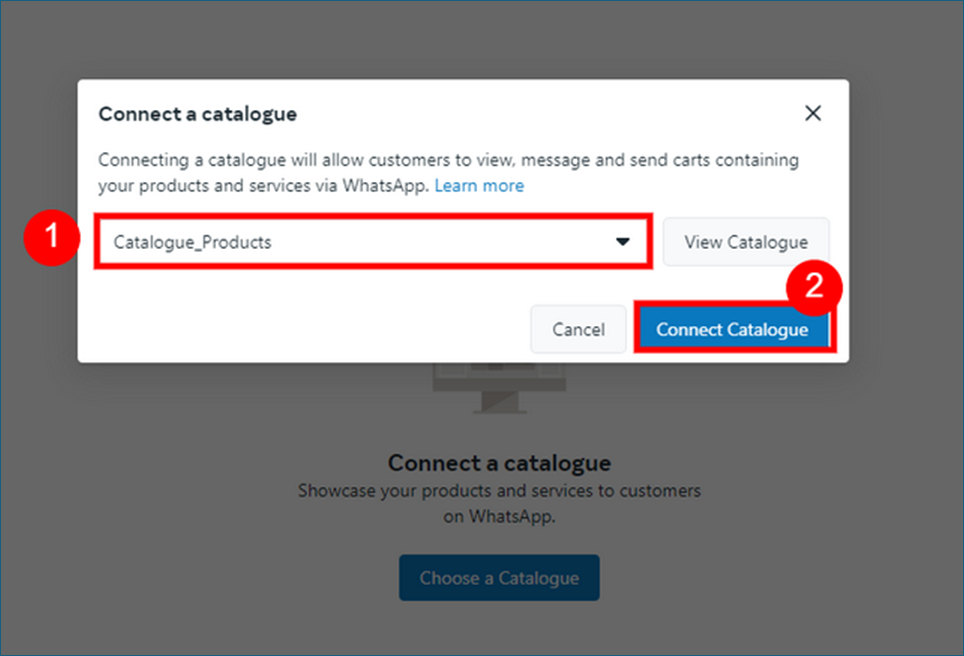
- Then select the catalog from the dropdown list and click on connect catalog button. That’s it.
- After connecting the catalog with your WhatsApp Business Manager, you will now need to import it into Chatify Bot to showcase or display products, along with the checkout option, inside WhatsApp.
Part3:
- Import Catalog on Chatify Bot
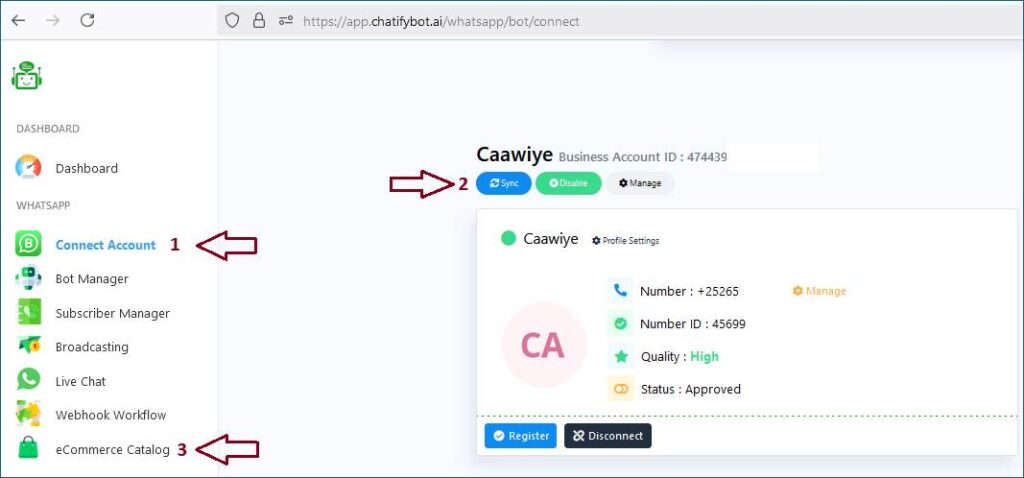
- Go to Connect Account under WhatsApp section.
- Click on Sync button under WhatsApp Number.
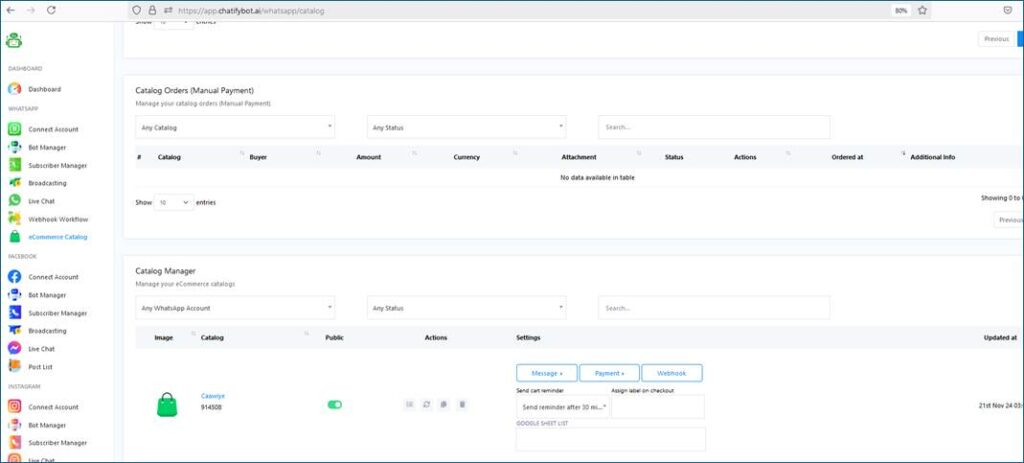
- Then go to eCommerce Catalog menu. Here you will find your connected catalog.
- How the catalog will be displayed on WhatsApp:
You can also share your catalog links with your users. Users can directly access the catalog by clicking on the link. If they click on the link from their mobile phones, they will be directed to the catalog on WhatsApp.
Link format of the WhatsApp catalog is: https://wa.me/c/yourphonenumber
Example: https://wa.me/c/252650000000
- Conclusion
Integrating your inventory into WhatsApp can significantly improve business communication. With the WhatsApp Catalog API, businesses can easily use catalogs from within the messaging service. By utilizing this functionality, you may reach a larger audience while giving thorough product information through the comfort of WhatsApp.
The streamlined experience of perusing catalogs on WhatsApp improves client engagement and has the potential to increase sales. Following the procedures indicated in this blog will allow you to seamlessly construct an ecommerce catalog and assign it to the WhatsApp Cloud API.
Step 1 walks you through the catalog creation process, which includes selecting product kinds, uploading methods, and manually adding products.
Step 2 then describes how to connect the catalog to the WhatsApp Cloud API using the WhatsApp Manager in the account tools.
With WhatsApp as a powerful business tool and catalog integration, you can increase sales, reach new customers, and provide a flawless buying experience all within WhatsApp.